Efficiently extracts audio, video, and timestamps from FLV files without recompression
Efficiently extracts audio, video, and timestamps from FLV files without recompression
Vote (3 votes)
Program license Free
Developer J.D. Purcell
Version 2.2.1.2
Works under Windows
Vote
(3 votes)
Developer
J.D. Purcell
Works under
Windows
Program license
Free
Version
2.2.1.2
Pros
- Extracts audio, video, and timestamps without quality loss
- Extremely easy to use and lightweight
- No installation required—portable application
- Includes command-line support for automation
Cons
- Lacks file format conversion or editing features
- Very basic interface with no advanced options
- Requires external apps to play some extracted streams
A lightweight utility to extract audio, video, and timecodes from FLV files.
Overview
FLV Extract is a compact tool designed to simplify the process of separating audio, video, and timecode streams from FLV (Flash Video) files. Offering both a graphical interface and a command-line mode, this utility focuses on doing one job well: pulling out media elements from FLV containers without any modification or re-encoding.
Simple and Functional Interface
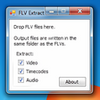
FLV Extract provides a minimalistic interface free from clutter or distractions. Users are greeted with straightforward checkboxes for selecting which elements to extract: audio, video, or timecodes. The process is intuitive—drop an FLV file onto the program window, and the extraction begins automatically. This basic setup suits anyone looking for efficiency without the need for configuration.
No Quality Loss
One of the tool’s standout features is its approach to extraction. FLV Extract directly separates streams without decompressing or recompressing them. This method preserves the original quality of both audio and video, ensuring there is no degradation during the process.
Supported Output Formats
The application is capable of generating several output formats based on the source material within the FLV:
Audio: MP3, AAC, Speex, and WAV (PCM)
Video: AVI or raw elementary streams
Users should ensure they have suitable media players or editors, as the program does not convert content to more mainstream formats but rather retains the original encoding.
Command-Line Features
For advanced users or batch processing needs, FLV Extract includes command-line support. This expands usability, allowing integrations into scripts or workflows, which can be especially useful for video professionals or archivists handling large sets of FLV files.
Performance and Compatibility
FLV Extract is lightweight and does not require installation, making it portable and easy to launch from external drives or different computers. It reacts quickly during operations and can handle multiple files with minimal impact on system resources. As a free utility, it remains accessible to a broad user base.
Limitations
The utility is highly specialized with no editing, previewing, or format conversion capabilities. Its reliance on the original streams means some users may need additional software to view or further process the extracted files. The interface, while efficient, offers minimal customization and does not guide users unfamiliar with FLV file internals.
Pros
- Extracts audio, video, and timestamps without quality loss
- Extremely easy to use and lightweight
- No installation required—portable application
- Includes command-line support for automation
Cons
- Lacks file format conversion or editing features
- Very basic interface with no advanced options
- Requires external apps to play some extracted streams